Bitmap vs. Vector Graphics
Computer drawing software creates and displays graphics in two basic ways: Bitmap or Vector
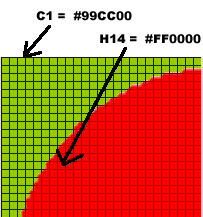
Bitmap graphics describe artwork using colored pixels arranged on a grid. Every pixel, or cell, is assigned an individual color.
Think of it as a game of Battleship, or as an Excel Spreadsheet that uses columns and rows to reference individual cells. The code in a bitmap graphic decsribes the color for every cell on the grid. Bitmap graphics are great for photographs, or even photo-realistic artwork
Vector graphics use math to describe shapes in terms of lines, fills, curves, colors, and position. This leads to decreased file sizes and decreased levels of detail, but vector graphics can be re-sized without any unwanted rasterizing:
Adobe Flash uses vector-based drawing tools. So does Freehand and In-Design.
Let's look at three
Scale - Vector graphics can be resized
up to infinity without losing resolution. Bitmap images tend
to rasterize (get fuzzy or jagged) when enlarged.
Efficiency - Vector graphics produce much
smaller files sizes than comparable bitmap graphics. This is especially important
when creating drawings and animations suitable for distribution
on the Web.
Detail - Vector graphics are not suitable
for highly detailed artwork, such as photographs. Bitmap graphics are a much
better choice.
Bitmap Drawing: Fireworks.gif |
Vector Drawing: Flash.swf |
Bitmap Zoom 400% |
Vector Zoom 400% |