Publish Settings
The sound quality of your final Flash project can be greatly effected by the settings you choose. However, the file size of your final project will ALSO be effected. Better quality sound = larger file size = slower download speeds! You need to come up with an acceptable compromise for each individual project.
For this specific example, sound quality is not a necessity: these are just short speech clips with no music and no need for stereo separation. You would not use this technique to deliver three full-length songs over the internet - it would take way too long for your project to download. In another lesson, we will study a technique for handling that type of project.
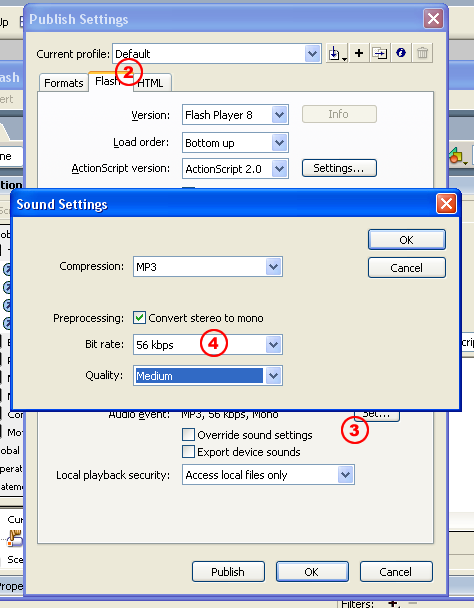
- To adjust the sound quality settings, click File and Publish Settings
- Select the Flash tab
- Under Audio Event, choose the set... button (Audio Event, NOT Audio Stream)
- Adjust the Bit rate and Quality settings like you see below